Sine Machine’s user presets are just normal .json files.
They are formatted to be friendly to edit in any code or text editor.
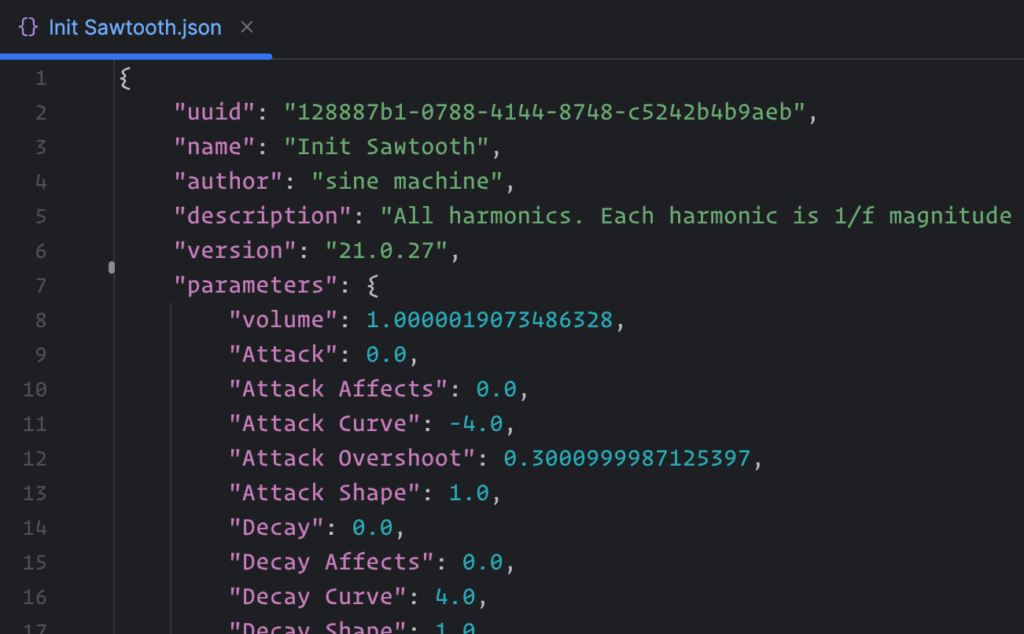
Hacking preset files
You can think of Sine Machine’s UI as just generating a bunch of numbers for the underlying synth engine.
“Hacking” the preset directly lets you escape the “rails” of the user interface and directly specify values for the engine — including details that go beyond what the UI can create.
If you make changes to a .json file after a patch has been loaded, you will need to reload/restart Sine Machine to get it to update to those changes.
Hacking preset files is fun but has risks
The main risks:
- Typos may cause the patch to no longer load.
- Sine Machine tries its best to read and import what it can, but there’s no detailed validation or way for you to be notified if something isn’t formatted correctly. For now, you can use a code editor or websites like https://jsonlint.com/ to validate basic syntax for you.
- If you edit something to be custom in the json (such as
gains), load the patch, then touch the corresponding control in the UI (in the case of agains, a harmonic volume bar), Sine Machine will recalculate/update to use the UI values for that control. If you then were to save the preset, you’d overwrite the custom values in the json.
When in doubt, make a backup of any hand-edited json! It’s happened before that people re-saved over their manual work.
In general, parameter values will be sanitized to ensure they stay within the parameter’s lower and upper bounds. However, it is possible to find some edge cases that will result in very loud or unpleasant sounds. Hack at your own risk — and watch your ears!
Modifying per-harmonic values
Any time you see an odd/even selector + “rainbow” harmonic XY control in the interface, they are working together to produce 511 values behind the scenes, 1 value for each harmonic.
For example, you could provide specific per-harmonic values for pitch noise:

If you open up the json file, you’ll find an entry for pitchNoiseAmounts.
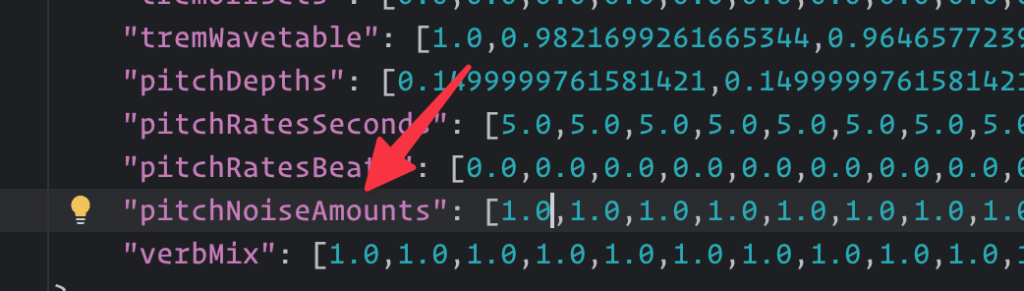
The first item in the brackets is the value for the first harmonic, the second item is the second, and so on.
The first item is the first harmonic, the second item is the second, and so on.
Values like pitchNoiseAmounts range from 0 to 1 which maps to 0 to 100% in the UI.
Feel free to alter the values you like. The json is pretty tolerant to editing.
For example, you could decide to specify only 5 values — for the first 5 harmonics — the rest will fall back to their default (in this case, 1.0) when imported:
"pitchNoiseAmounts": [0.1,0.2,0.3,0.4,0.5]Remember, if you then touch “pitch noise” controls in the UI, the pitchNoiseAmounts will then all get recalculated.
Editing partial pitch ratios via pitchMapping
By editing pitchMapping in the json, you can change the ratio of the partials to be non-harmonic, something not possible to do in the UI itself.
See the factory preset Leads > the softest sine for an example. All partials are set to be sightly detuned fundamentals.
Editing “volume bars” / gains
The volume bars in Sine Machine are real automatable DAW parameters. As DAW parameters, their data must live in the json. They live in the parameters block as gain01 and gain02.
When the upper volume bars (32-26) are moved in the UI, Sine Machine calculates values for harmonics/partials 37-511. So we need a place to store gains that are not parameters. That’s the main gains array in the json.
This gains array is the actual source of truth for the audio engine for all harmonics/partials on preset load. When you edit the preset json manually and want to change what the volume bars in Sine Machine would be set to sonically, you would edit this main gains array.
Remember, Sine Machine’s UI displays gains normalized to 1/f where f is the harmonic number — So if you edit both the first partial and second partials so they both have the value of 0.1 they will look different in the UI!
If you edit a partial to have a higher value than 1/f (for example, setting the third partial to 0.5) then it will not accurately display that in the UI — and touching that partial will set it to the 1/f maximum for that partial (0.3333 in this case).
27.3.9 and earlier: If you want the volume bars to display the correct db value (not just be set to it behind the scenes) you’d need to also manually edit the individual parameter gain01 parameter values.
27.4.x and later: The gain01 parameter values in the json are no longer used at all — Sine Machine will derive both the sound and the display of the volume bars from the main gains array.
Geeky historical note: You may be wondering why WHY WHY?! were there ever 2 representations of volumes/gains in the json file. The answer is because long ago, in simpler times, Sine Machine used to have 511 actual DAW parameters, including volume and envelope parameters. But DAWs like Logic would fail to do automation correctly (even if only one or two parameters were actively being automated). Ableton struggles with even displaying large numbers of parameters. So we had to whittle down to only having 36 automatable parameters and the rest of our values are stored in gains which becomes the “source of truth”. Today, the individual gain01/02/etc parameters exist just to please DAWs — editing them in json doesn’t affect sound or display.
JSON Hacking ProTips
- The preset name that Sine Machine will display in the UI is the value of
namein the json (not the preset’s file name!). - Envelope values (
decayorrelease), are always specified in seconds. - If you want to change the tuning of the partials, specify the ratios in
pitchMapping— don’t worry about these going above nyquist, the engine will not attempt to produce sounds above nyquist. - The order/location of where things are in preset.json (line number, etc) may differ from preset to preset, version to version, person to person.
- When re-saving a preset that you previously manually edited: note the exact numbers saved back to the json might differ if you compared to what was hand-written). For example, if you wrote
0.5in an array, you might then see that saved back to the json as0.4999999701976776. You can geek out with Julia Evans on how computers store numbers, both on her blog and in her amazing floating point info-zine.
Leave a Reply