Every harmonic from every voice in Sine Machine has an independent volume and pitch, as well as independent pitch and volume LFOs.
That’s a lot of moving parts. Nobody wants to edit spreadsheets of harmonic values. Well, some might, but most do not.
In a way, Sine Machine’s main job is to offer up different types of “meta” controls over the pitch and volumes of harmonics. For example, you can shape overall volume over time with the Envelopes section or create volume patterns with the Trem section.
Not every control in Sine Machine is “per-harmonic” or even “per-voice” — for example Trem Sharpness is an algorithm that applies to all harmonics across all voices. Pitch Stiffness is an algorithm that determines how stiff each harmonic is, applied to all voices.
The “Odd/Even/Octave” Selector

This humble toggle does a lot of heavy lifting around Sine Machine.
It basically says “apply the slider I’m connected to to ONLY a subset of harmonics.”

Clicking the toggle cycles through 4 choices:
- All Harmonics. The control applies to all harmonics.
- Odd Harmonics. The control applies to harmonics 1, 3, 5, 7… etc. Odd octaves only is the same thing as a square wave.
- Even Harmonics. The control applies to harmonics 2, 4, 6, 8, etc. You can think of even harmonics as an “octave up” version of the note: If you silence all the odd harmonics, you would hear a sawtooth wave 1 octave higher.
- Octave Harmonics. These are true octaves of the fundamental, the most consonant. The control applies to harmonics 1, 2, 4, 8, 16, 32, etc… Targeting them modulates the core pitches and leaves the “color” harmonics alone.

The “Rainbow” Harmonic XY control
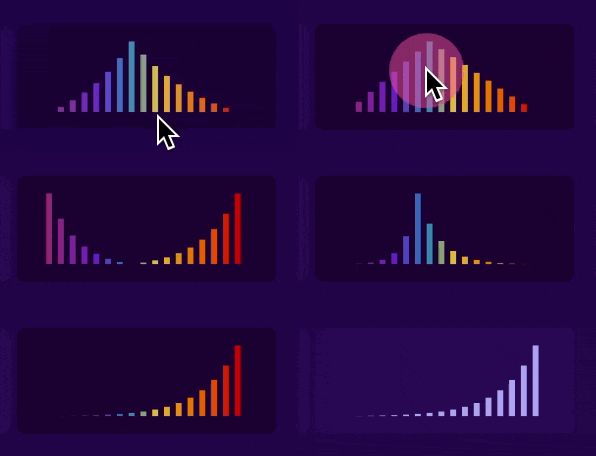
Another small-but-powerful control, the Harmonic XY or “Rainbow XY” controls the distribution of the value across harmonics.
The parameter names in your DAW for these XY widgets are always named Distribution (x position) and Curve (y position). So for example Trem Amount Distribution and Trem Amount Curve.
In it’s default position, all harmonics get the same amount of value:

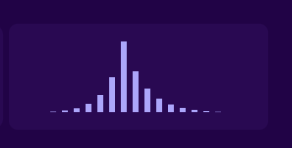
When you click and drag upwards you create a peak. Remember, we don’t hear linearly, so when the peak is in the middle, it’s at the 36th harmonic (not 256th!).
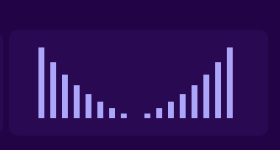
You can also drag down and get 2 peaks:
If far left is 0.0 and far right is 1.0, here’s what the x position represents:
| left/right position | peak harmonic |
|---|---|
| 0.00 (far left) | 1 |
| 0.25 | 10 |
| 0.33 | 14 |
| 0.50 (middle) | 34 |
| 0.66 | 79 |
| 0.75 | 129 |
| 1.00 (far right) | 511 |
Leave a Reply